
Conference room technology should support the meetings your organization actually has, rather than only the platform selected when the room was installed. Employees may schedule Teams, customers may send Zoom links, partners may use Webex, and project teams may prefer Google Meet. The room still needs reliable audio, video, content sharing, control, security, and support.
A platform-agnostic room strategy separates the durable layers of the room from the meeting service that may change from session to session. That does not mean every product supports every platform in every mode. It means the architecture starts with choice as a requirement and validates the specific combinations the organization needs.
- Platform-agnostic room technology is designed so collaboration, audio, video, display, management and user experience are not unnecessarily tied to one meeting service.
- The room should support the meetings your organization actually has, rather than only the platform selected when the room was installed.
- A room has five layers: the physical space, AV, meeting compute, content collaboration, and network, security and management. Only one of them is the meeting service.
- A locked room and a platform-agnostic room are both legitimate designs; the choice belongs to the room portfolio, not to a single space.
- Support still has to be confirmed by platform, product and configuration; architecture that starts with choice is not the same as universal support.
The Polaris architecture moves the category conversation from a receiver to a managed, room-centered platform.
- Layer 1 · In the room · The glass: The display becomes a rendering endpoint for meetings, classes, and signage.
- Layer 2 · Unit of work · The workspace: Multiple live sources can sit side by side instead of competing for one mirrored screen.
- Layer 3 · Across the fleet · The cloud: Sessions, rooms, updates, policies, health, analytics, and signage share one management plane.
Platform-agnostic conference room technology is designed so the room's collaboration, audio, video, display, management, and user experience are not unnecessarily tied to one meeting service. Support must still be confirmed by platform, product, and configuration.
Why meeting-platform choice changes
Organizations rarely operate in a permanent single-platform world. Acquisitions introduce new standards. Customers bring external invitations. Business units adopt specialized tools. Contracts and product strategies change. Even a company with one preferred platform still receives meetings from outside its environment.
When the room is built as a dedicated appliance for one ecosystem, outside meetings may require guest-join features, a laptop fallback, a cable, or another room. Those options can work, but their quality and availability vary. Buyers should understand the tradeoff rather than assume that a familiar logo guarantees universal meeting access.
01The physical room
Room size, acoustics, lighting, seating, sight lines, display placement, power, accessibility, and furniture establish the boundary conditions. A sophisticated platform cannot correct a microphone that is too far from the participants or a display that cannot be read from the back row.
02Audio, video, and display
Cameras, microphones, speakers, displays, switchers, control systems, and signal paths should be selected for the room's purpose. Document supported connections, resolutions, audio processing, peripheral ownership, and the team responsible for each component.
03Meeting compute
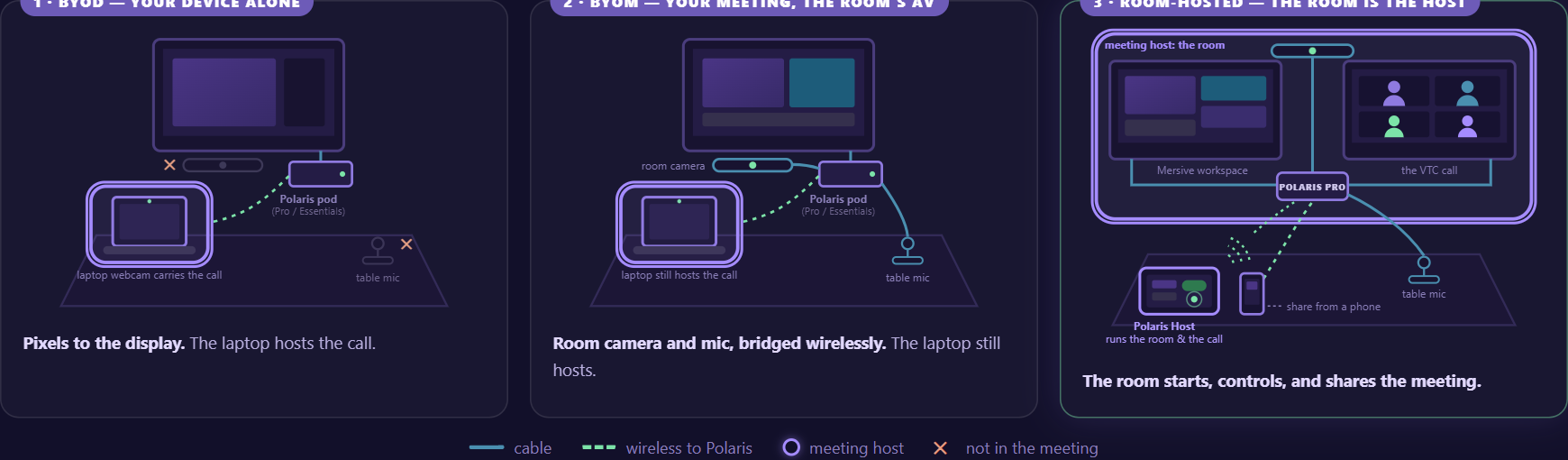
The meeting may run on a participant's device, use the participant's service with room peripherals, or run on dedicated room compute. These BYOD, BYOM, and room-hosted models create different requirements for identity, control, updates, platform choice, and support.
04Content collaboration
The room also needs a path for local content. A wireless display may mirror one source. A collaboration workspace can let several people contribute and compare information. In a hybrid meeting, shared content must also reach remote participants through an approved path.
05Network, security, and management
Discovery, signaling, media, identity, administration, and updates must fit the network. At fleet scale, IT and AV teams need consistent configuration, monitoring, lifecycle ownership, and a way to diagnose whether an issue belongs to the room, service, device, network, or user workflow.
Locked room or platform-agnostic room?
- Primary experience. Single-ecosystem room: Optimized around one meeting service and its certified workflow. Platform-agnostic strategy: Designed around multiple approved meeting paths.
- External invitations. Single-ecosystem room: Depends on supported guest-join or fallback behavior. Platform-agnostic strategy: Choice is an explicit requirement, tested by service and mode.
- Room consistency. Single-ecosystem room: Strong inside the selected ecosystem. Platform-agnostic strategy: Requires governance across more combinations.
- Lifecycle risk. Single-ecosystem room: Room roadmap follows the selected meeting ecosystem. Platform-agnostic strategy: Architecture aims to separate durable room layers from service choice.
- Best fit. Single-ecosystem room: Organizations committed to one service and its room standard. Platform-agnostic strategy: Organizations with mixed invitations, changing standards, or portfolio flexibility needs.
A single-ecosystem room can be an excellent choice when the organization accepts the boundary and the guest workflow meets its needs. Platform-agnostic is not automatically simpler. It requires disciplined testing and clear support ownership. Its value is flexibility, not the absence of architecture.
Questions to ask before standardizing rooms
- Which meeting services must the room support as a host, as a guest, and through a participant device?
- Which room types need BYOD, BYOM, room-hosted meetings, or a combination?
- How do employees and guests share local content without starting an unnecessary call?
- Which cameras, microphones, speakers, displays, and controllers are supported in each mode?
- How are identity, calendars, room accounts, permissions, updates, and sign-out handled?
- What happens when a meeting invitation comes from an unsupported or newly adopted service?
- Can IT and AV monitor and manage the room fleet without operating a separate tool for every variation?
- How will the organization test platform changes before they reach production rooms?
A practical room-portfolio approach
- Classify the rooms: Group spaces by size, purpose, meeting mix, AV complexity, and support model.
- Classify the meetings: Estimate internal versus external invitations, preferred services, local-only collaboration, and hybrid requirements.
- Choose the hosting model: Decide where the meeting runs for each room type and define an approved fallback.
- Design the content path: Test local sharing, multiple contributors, guest participation, and delivery to remote attendees.
- Validate the architecture: Review networks, identity, security, peripherals, management, updates, and lifecycle.
- Pilot edge cases: Include external invitations, guest devices, difficult rooms, different networks, and platform changes.
Where Mersive Polaris fits
Mersive Polaris separates the room experience into a shared display workspace, flexible contribution paths, hybrid meeting models, and a common cloud-management layer. The strategic idea is that the meeting service can change while the room's collaboration experience and management model remain coherent.
The practical way to evaluate any platform-agnostic room - Polaris included - is to test it against the meetings your organization actually runs. Bring a Teams call, a Zoom call, a guest with a webinar on another service, and a presenter who just wants the display without any call, and watch how the room handles each without reconfiguration. A room that passes that afternoon of tests will keep its promise; one that needs an exception process for the second platform will not.
What technology is needed in a conference room?
Most rooms need suitable displays, audio, video, meeting compute, content sharing, controls, network access, power, and management. The exact design depends on room size, meeting model, acoustics, security, accessibility, and the services the room must support.
What does platform-agnostic mean in a meeting room?
It means the room is designed to support more than one approved meeting service or workflow rather than being permanently dependent on one ecosystem. The term does not imply unlimited compatibility; the supported services, modes, and prerequisites must be documented.
Can one room support Teams, Zoom, Webex, and Meet?
Some architectures support multiple services through BYOD, BYOM, guest-join, browser, or room-hosted methods. Experience and feature depth vary. Test the exact services, invitation types, peripherals, controls, and account model required by the organization.
Should local screen sharing require a video call?
Not necessarily. A separate wireless display or collaboration workspace can support local content without starting a remote meeting. This can be useful for in-room sessions, while hybrid meetings still need an approved path to send content to remote participants.