
A hybrid meeting brings together participants who are in the same physical room and participants who join remotely. The meeting succeeds when both groups can see, hear, contribute, and understand what is happening without one location becoming the default audience. That requires more than a video call. It requires intentional room design, reliable audio and video, clear content sharing, understandable controls, and operating practices that support equal participation.
This guide explains the main hybrid meeting technology models, the layers of a hybrid room, practical best practices, and the questions organizations should answer before standardizing their rooms.
- A hybrid meeting combines in-room and remote participants in one session, with room technology and meeting practices designed to give both groups meaningful access.
- It succeeds when neither location becomes the default audience, which takes more than a video call.
- Three technology models are in play: BYOD, BYOM and room-hosted, and most fleets need a portfolio rather than one answer.
- A hybrid room has seven layers, from acoustics and microphones through cameras, displays and meeting compute to the network and cloud management.
- Best practices split before, during and after the meeting, and quality is measurable rather than a matter of opinion.
What is a hybrid meeting?
A hybrid meeting is a scheduled or spontaneous collaboration session in which some participants share a physical meeting space and others participate through a remote meeting service. In-room participants use shared cameras, microphones, speakers, displays, content-sharing tools, and controls. Remote participants use their own devices and depend on the room system to represent the people and content in the physical space.
Hybrid is no longer a transition phase. Gallup's tracking of remote-capable U.S. employees has found roughly half working hybrid every year since 2022 - 51% in its 2025 update, with only about a fifth fully on-site. The arithmetic for meetings is unforgiving: when even one regular attendee is somewhere else that day, the meeting is hybrid. Designing rooms for mixed-location participation is now the default requirement, not a special case.
A hybrid meeting combines in-room and remote participants in one collaborative session, using room technology and meeting practices designed to give both groups meaningful access to people, conversation, and content.
A video conference can be entirely remote. A hybrid meeting has an additional challenge: the room creates a group within the group. People in the room share physical cues, side comments, and a common display. Remote participants receive only what the room technology and meeting behavior transmit.
Three common hybrid meeting technology models
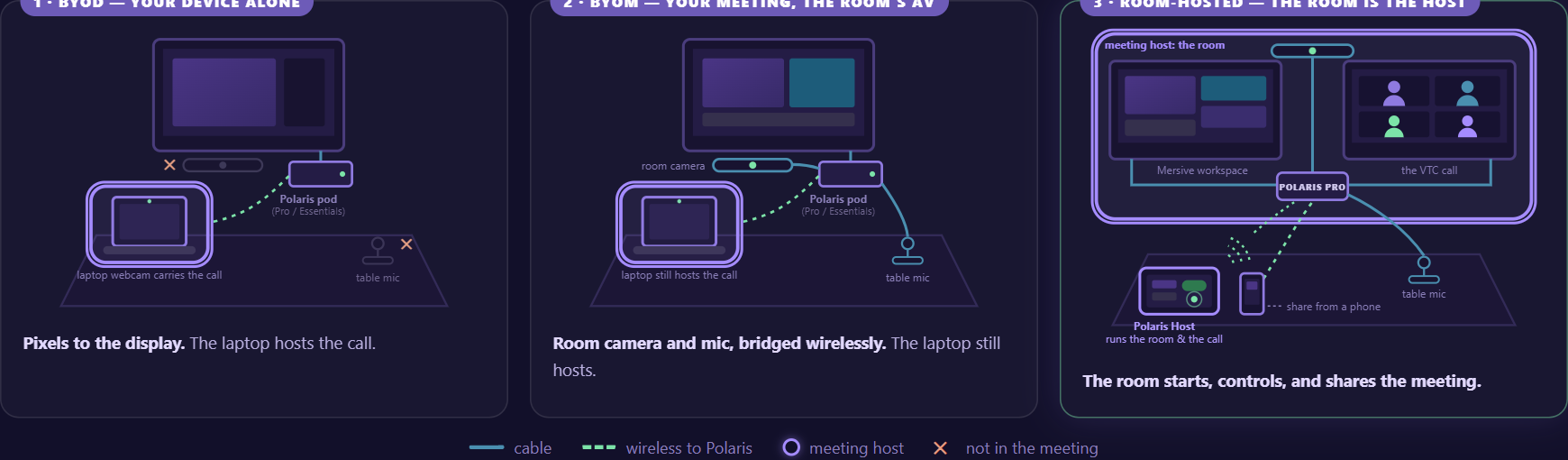
Three technology models cover nearly every hybrid room, and they differ in one thing: where the meeting itself runs - on a participant's laptop, on a laptop borrowing the room's audio and video, or on the room's own compute. The figures below are the same three room models the rest of this site uses to classify meeting spaces.
01BYOD: bring your own device
In a BYOD model, a participant uses a laptop or other personal device to run the meeting. The device may rely on its own camera, microphone, speakers, and screen, or it may connect to selected room components. BYOD can be flexible in small rooms, but inconsistent peripherals, battery life, cables, audio routing, and user settings can affect the experience.
02BYOM: bring your own meeting
In a BYOM model, the participant's device runs the chosen meeting service while using approved room cameras, microphones, speakers, and displays. This can preserve platform choice and improve room audio and video, but the connection and control workflow must be clear. Test device permissions, peripheral handoff, audio routing, driver requirements, and the transition between local sharing and the remote meeting.
03Room-hosted meeting
In a room-hosted model, dedicated room compute runs the meeting experience. Participants use a room controller or approved join flow rather than making one person's laptop the host. This can create consistency and reduce dependence on an individual's device, but it requires room-standard decisions about meeting-platform support, identity, calendar integration, controls, updates, and lifecycle.
Many organizations use more than one model. A small huddle room may favor BYOD or BYOM, while a large boardroom may use dedicated room compute. The strategic question is whether those rooms can still feel coherent to users and manageable to the teams that support them.
The seven layers of a hybrid meeting room
A hybrid room is a stack of seven layers, and a weakness in any one of them surfaces to users as "the room doesn't work." The layers run from the physics of the space up to the cloud that manages it.
01Room acoustics
Microphone and speaker performance begins with the physical room. Hard surfaces, glass, HVAC noise, table shape, distance, and participant behavior affect what remote attendees hear. Technology cannot fully compensate for a room that has not been assessed for speech.
02Microphones and speakers
Remote participants need consistent speech capture from every seat and room audio that does not echo or force people to strain. Test normal conversation, quiet voices, overlapping speech, movement, playback, and the behavior of the conferencing platform's audio processing.
03Cameras and visual framing
The camera should help remote attendees understand who is speaking and how the room is reacting. Framing depends on room size, seating, sight lines, camera placement, lighting, and the meeting style. Avoid a design that makes the room visible only as a distant group.
04Displays and content
The room needs enough visual space for remote participants, shared content, and meeting controls without forcing constant tradeoffs. One display may work in a small room. Larger or more collaborative spaces may benefit from separate views. Content should remain legible to both the farthest seat and a remote attendee on a laptop.
05Meeting compute
The meeting service can run on a participant device, a room device, or another approved compute architecture. That decision affects platform flexibility, identity, room start time, updates, support, peripheral access, and user control.
06Content contribution and workspace
Content may come from the meeting host, another in-room participant, a remote attendee, a browser, a native sharing protocol, or a room source. A good design makes those paths understandable and preserves context when contributors change. A shared room workspace can be useful when the group needs to compare several sources instead of viewing only the most recent screen.
07Network and cloud management
Hybrid rooms depend on network performance, service availability, identity, device configuration, and updates. Administrators need a clear model for monitoring the room, diagnosing issues, applying policy, and understanding which team owns each layer. Centralized management can reduce room-by-room variation when it is paired with defined operating responsibilities.
What is meeting parity?
Meeting parity - often called meeting equity - is the principle that in-room and remote participants get the same access to the meeting: the same view of shared content, the same ability to hear and be heard, and the same standing when a decision forms. The seven layers above are the machinery; parity is the outcome they exist to produce.
The test is easy to state and demanding to pass: could a remote participant describe what the room is looking at right now, and did the room hear the point a remote participant just made? Rooms fail this quietly - a camera pointed at a distant huddle, content visible only on the room display, decisions forming in side conversations - and remote attendees respond by disengaging.
Technology can carry most of the load. Mersive approaches parity by mirroring the room's shared workspace live to every participant's own screen, in the room or remote, so nobody has to read a display through a camera. However a room achieves it, parity should be measured: the participation-balance and content-access measures later in this guide are parity measures by another name.

Hybrid meeting best practices before the meeting
- Choose the meeting model intentionally: Decide whether the session is BYOD, BYOM, or room-hosted before participants arrive.
- Open the remote room early: Give the organizer time to confirm audio, video, content, layout, and participant admission.
- Share the agenda and materials: Remote participants should not depend on reading a distant room display or receiving a file after discussion begins.
- Assign facilitation roles: Name a facilitator and, for important sessions, a person who watches chat, raised hands, and remote-participant signals.
- Design the visual workspace: Decide where remote people, shared content, and in-room contributions will appear.
- Plan accessibility: Collect accommodation needs, enable approved captioning or transcription, use readable materials, and avoid relying only on color or small text.
Hybrid meeting best practices during the meeting
- Start with orientation: State who is in the room, who is remote, how to contribute, where content will appear, and how decisions will be captured.
- Use one conversational floor: Avoid side conversations that remote attendees cannot hear or interpret.
- Name speakers and visuals: Say who is speaking and what has changed on screen, especially when the camera view is wide.
- Bring remote participants in early: Ask for remote input before the room develops a separate momentum.
- Share content through the meeting: Make important material available to remote participants directly rather than through a camera pointed at a display.
- Keep contributions visible: When comparing options, preserve useful sources in a shared workspace or distribute the material so participants can refer to it.
- Pause for comprehension: Check audio, captions, chat, and understanding after a complex explanation or room discussion.
- End with decisions: State actions, owners, dates, and where the shared record will live.
Hybrid meeting best practices after the meeting
- Close the room session: End sharing and the remote meeting, sign out of temporary accounts, and confirm that room content has cleared.
- Publish the record: Send decisions, actions, materials, and any approved recording or transcript according to policy.
- Capture friction: Record start delays, audio failures, content issues, support calls, and participant feedback while the details are fresh.
- Improve the standard: Use recurring issues to update room design, instructions, configuration, training, or ownership rather than treating every problem as user error.
How to choose a hybrid meeting model by room type
- Personal or focus room. Likely starting model: BYOD. Questions to answer: Is individual-device audio and video sufficient, private, and easy to use?
- Small huddle room. Likely starting model: BYOD or BYOM. Questions to answer: Can users connect to the room peripherals and share content without audio confusion?
- Standard conference room. Likely starting model: BYOM or room-hosted. Questions to answer: Which meeting services, peripherals, displays, controls, and guest flows must be supported?
- Large room or boardroom. Likely starting model: Room-hosted with defined alternatives. Questions to answer: How will cameras, microphones, multiple displays, control, support, and room ownership work?
- Flexible or divisible space. Likely starting model: Purpose-designed architecture. Questions to answer: How will the system adapt to room modes, participant locations, acoustics, and changing layouts?
These are starting points, not rules. Meeting type, security, accessibility, platform policy, support capacity, and the existing AV fleet may lead to a different design.
How to measure hybrid meeting quality
Technical uptime matters, but a room can be online and still create a poor meeting. Combine operational data with participant experience.
- Time to start: How long does it take from entering the room to a working audio, video, and content session?
- Successful first attempt: How often can organizers start without changing devices, inputs, networks, or support paths?
- Audio and video quality: Can remote participants consistently hear and understand every seat and see relevant room activity?
- Content access: Can all participants read, receive, and contribute to the material being discussed?
- Participation balance: Are remote attendees contributing to decisions, or only observing a conversation in the room?
- Support demand: Which rooms, devices, platforms, and workflow steps generate incidents or repeated questions?
- Configuration consistency: Do rooms of the same type behave the same way across locations?
- User confidence: Do organizers choose rooms and meeting models intentionally, or avoid them because the outcome feels uncertain?
Where Mersive Polaris fits
Mersive Polaris frames hybrid collaboration as a continuum rather than a single room recipe. At one end, a participant brings the device and the meeting. At another, the room takes on more of the hosting and control. Across those models, the display can remain a shared workspace and the room fleet can remain visible through a common cloud layer.
That platform-agnostic direction matters because organizations rarely have one meeting service, one device type, or one room design forever. A flexible contribution model can reduce the tension between local collaboration and remote participation, provided that the released product supports the required peripherals, meeting services, network architecture, and controls.
The right evaluation begins with room journeys, not product labels. Test an employee starting the room, a guest presenting, a remote participant trying to follow the discussion, a second in-room contributor comparing content, and an administrator diagnosing the space. Then verify that the platform makes those journeys more coherent across the fleet.
What is the difference between a hybrid meeting and a virtual meeting?
A virtual meeting can have every participant joining from an individual device. A hybrid meeting includes at least one shared physical space with multiple in-room participants and one or more remote participants. The shared room creates additional audio, video, content, and participation requirements.
What technology is needed for a hybrid meeting?
Most hybrid rooms need suitable microphones, speakers, cameras, displays, meeting compute, content sharing, controls, network access, and a supported video-meeting service. The exact design depends on room size, meeting model, acoustics, security, accessibility, and platform standards.
What is BYOM?
BYOM means bring your own meeting. A participant uses a personal or managed device to run the chosen meeting service while connecting to approved room displays, cameras, microphones, or speakers. The connection and supported peripheral scope vary by room system.
How do you make hybrid meetings more inclusive?
Design for equal access to speech, faces, content, chat, captions, decisions, and facilitation. Use good room acoustics and framing, distribute materials, avoid side conversations, monitor remote signals, and measure whether remote participants can contribute rather than merely attend.
Should every room use the same hybrid meeting model?
Not necessarily. Different room types can use different models, but the organization should standardize the user instructions, security requirements, management practices, and support ownership enough to create a coherent experience.